Showing posts with label Comments. Show all posts

Friday, July 1, 2016

Top Commentators Widget with Avatars for Blogger

The commentators are a fundamental part of any blog, since they are the ones that give life to the blog, opening and replying to discussions which leads to more activity in the posts.
how to add top commenters widget to blogger

It is therefore very important to know which are the most active users of your blog, the users who leave more comments, and for this reason, today I present a great method to display a list with the top commentators.

The gadget will look something like this:

add top commentators widget to blogger

This Top Commentators gadget comes with user's avatar and is done with JavaScript.

How to Add the Top Commenters Gadget to Blogger


Wednesday, June 22, 2016

Add a Cool Style to Blogger Threaded/Nested Comments

If you need a fresh style to the threaded comments of a standard Blogger template, here's a simple CSS that will help you to apply a different background, make your avatars rounded, add a border with rounded corners and a triangle which is actually an HTML entity to get that speech bubble look on your comments.

You can see a demo here.

To have this style in your comments, all you need to do is to paste the below code inside the CSS part of the template, which is between <b:skin> and </b:skin>

Styling Simple Nested Comments with CSS


Tuesday, June 21, 2016

How to Enable Google Plus Comments in Blogger

How to Enable Google Plus Comments in Blogger

Long time ago, Google proudly announced their new integrated commenting system which is now available for users who have created a Google+ profile and connected it with their Blogspot blogs. This way, Blogger users will be able to use Google+ as a commenting system for their blogs, while comments from Google+ will automatically appear on their blogs.
google plus commenting system on blogger

For those who haven't yet upgraded the Blogger profile to a Google+ profile, here's a tutorial on how to associate a blog to a Google plus page. Once you have connected a blog to a Google+ profile, you'll have a new "Use Google+ Comments on this blog" setting on the Google+ tab of your blog. To enable the Google plus commenting system, just check the box next to this setting:

use google+ comments on this blog, blogger tutorial

As soon as you've enabled the feature through your Blogger Dashboard, you'll have the following features:

- Threaded commenting system: the threaded system will allow a reader to reply to other comments on that post, thus the conversations will become much easier, more effective and more enjoyable
- Public and private comments: this ensures a better privacy for your visitors which can make their comments either public or private
- Edit or delete comments: your visitors will be able to edit any comments that they wrote even after publishing, so they don't have to write another comment explaining the correction
- Google Plus One (+1) button in comments: we can up-vote any comment by clicking this button. This is a great feature which could also help you to get some traffic from Google+
- "Also share on Google+" check box: with this option which is right below the comment editor, we will be able to share a specific comment on Google+ and thus get more traffic!

Wednesday, June 15, 2016

How to Display Most Commented Posts in Blogger

One of the best gadgets for your Blogger blog is a popular posts widget for your sidebar. This lets visitors see what your trending posts are right now and encourages them to click on them to read them. This basic widget is just a little too basic, however, for the modern day website visitor. Not only do they want to see your trending posts, but they also want to join the discussions that are happening on your blog. To do that, you'll need a most commented posts widget for Blogger.

Having a customized widget on your site is a lot easier than you might think. In order to have an effective widget, however, you're going to need a few specific things to help you out.

most commented posts widget

Here's What You're Going To Get

Show/Hide Blogger and Google+ Comments System With Toggle

Many Blogger site owners received the new Google+ Comment System pretty negatively because it forced all commenting users to create their own Google+ account before they were able to write a comment. The Google+ Comment System on Blogger was convenient to writers, but discouraged many users from continuing to comment on blogs because they simply didn't want to use Google+. For those that did use Google+ to make a comment, Blogger would never email you and notify you that someone left a comment; you could go days or weeks without ever realizing that you never responded to a reader.

In addition to frustrating your audience, the Google+ Comment System on Blogger depended upon the URL of your blog post. By changing your URLs or moving around your blog posts internally, you run the risk of losing every one of your comments that was placed using Google+.

Previously, the only way to solve this problem was to disable the comment system through your account settings, thus giving up your ability to use their Google+ account. Now, there's an easy new way to have the best of both worlds. Allowing fans of Google+ as well as everyday blog readers to access all same features, you’ll be able to engage every visitor equally. You can respond to comments while still being able to communicate with other Google+ users outside of your site and take advantage of the Google+ Comment System on Blogger.

google plus comments, blogger

How to Integrate Blogger and Google Plus Comments

Friday, April 26, 2013

Expandable Recent Comments Widget for Blogger/Blogspot

The Expandable Recent Comments widget for Blogger is a very accessible widget that can be collapsed or expanded through user interaction, so we don't have to click the author's name or post title link in order to read the content of a comment. The expanding content can be shown or hidden by clicking the plus/minus icon or by hitting the "Show all" or "Hide all" button.

recent comments widget, blogger gadgets, blogspot tricks

To add the Expandable Recent Comments widget for Blogger, please follow the next steps below:

Adding Expandable Recent Comments Widget to Blogger

1. From your Blogger dashboard, go to "Layout", then click on "Add a Gadget" link:


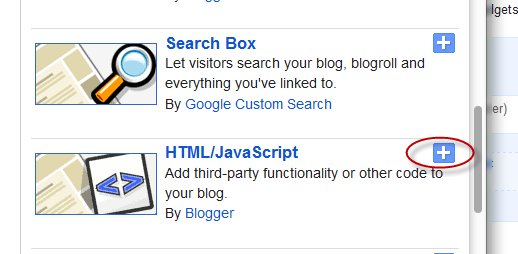
2. When the pop-up window appears, scroll down and select the "HTML/JavaScript" widget:


3. Copy and paste this code inside the empty box:
<style type="text/css">.row-div {margin-bottom:10px;}.comment-header {margin:10px 0;}.comment-box{margin:0px;padding:0px;font-size:0.9em;height:330px;overflow:auto;}.comments1{padding:3px;border-left:1px dashed #A6A6A6;color: #888888;font-style: italic;padding:0px 10px 10px 10px;margin-bottom:10px;}
</style>
<div style="text-align: center" class="comment-header"><input class="comment-button" id="commshowall" type="button" onclick="if (this.value == &#39;Show all&#39;) { unfold_all(this); this.value=&#39;Hide all&#39;; } else { fold_all(this); this.value=&#39;Show all&#39;; }" value="Show all" /></div>
<div class="comment-box">
<script type="text/javascript">
var tgl=false;var title_arr=new Array();var arr=0;var err="[err]";var icon_expand="https://blogger.googleusercontent.com/img/b/R29vZ2xl/AVvXsEgCEwVZUA9yIGBxFvN6g8Ahnd8MC4wCzOk8sgS3I0CAiLqzZjEBM7Yqs0fafpMZ_BmN45aq1RL7e_1GB_SvQGhZRfEDrAbDuFSf1bzRV98DgDXjwnwV5QiqYASo9Bs2zvQXUj_JK68BX-Vw/s1600/icon-plus.png";var icon_collapse="https://blogger.googleusercontent.com/img/b/R29vZ2xl/AVvXsEgIwYuA0ZQs7oGg_jCTd6iR-C6eXj5FZP7OZxU4l244eQCR-5nSdgOtELHegfQ9fKH0fItX1Svqi2tQu7g0auDmZB5G0ck_JNrH3kLO5CoTh4w9teinfy-ymNJ8MMO3hhPgAx1Q4vvz8r8m/s1600/icon-minus+copy.png";var maxcomments=20;function real_posttitle(postid){for(var i=0;i<title_arr.length;i++){if(title_arr[i][0]==postid)return title_arr[i][1];}
return err;}
function showrecentposts(json){var numposts=999999;for(i=0;i<numposts;i++){var entry=json.feed.entry[i];var postid;var title;if(i==json.feed.entry.length)break;for(var k=0;k<200;k++){if(entry.link[k].rel=='self'){postid=entry.link[k].href;postid=postid.substr(postid.lastIndexOf("/")+1,100);}
if(entry.link[k].rel=='alternate'){title=entry.link[k].title;break;}}
title_arr[arr]=postid+"&#176;"+title;title_arr[arr]=title_arr[arr].split("&#176;");++arr;}}
function unfold(el){var comid=el.id.substr(8,10);if(el.src==icon_expand){el.src=icon_collapse;document.getElementById("com_id"+comid).style.display="block";}else{el.src=icon_expand;document.getElementById("com_id"+comid).style.display="none";}}
function unfold_all(el){try{for(var i=0;i<maxcomments;i++){document.getElementById("com_id"+i).style.display="block";document.getElementById("click_id"+i).src=icon_collapse;}}catch(e){;}
el.value='Show all';}
function fold_all(el){try{for(var i=0;i<maxcomments;i++){document.getElementById("com_id"+i).style.display="none";document.getElementById("click_id"+i).src=icon_expand;}}catch(e){;}
el.value='Hide all';}
function showrecentcomments(json){var numcomments=999999;var postid;var i=0;for(i=0;i<numcomments;i++){var entry=json.feed.entry[i];var alturl;var anonymous=false;if(i==json.feed.entry.length)break;for(var k=0;k<entry.link.length;k++){if(entry.link[k].rel=='self'){postid=entry.link[k].href.split("/");postid=postid[5];}
if(entry.link[k].rel=='alternate'){alturl=entry.link[k].href;break;}}
var postlink=alturl.split("#");postlink=postlink[0];var linktext=postlink.split("/");linktext=linktext[5];linktext=linktext.split(".html");linktext=linktext[0];var profilelink="";try{profilelink=entry.author[0].uri.$t;}catch(e)
{anonymous=true;};var posttitle=real_posttitle(postid);if(posttitle==err){posttitle=linktext.replace(/-/g," ");}
var commentdate=entry.published.$t;var cdyear=commentdate.substring(0,4);var cdmonth=commentdate.substring(5,7);var cdday=commentdate.substring(8,10);var ctime=commentdate.substr(11,5);var monthnames=new Array();monthnames[1]="january";monthnames[2]="february";monthnames[3]="march";monthnames[4]="april";monthnames[5]="may";monthnames[6]="june";monthnames[7]="july";monthnames[8]="august";monthnames[9]="september";monthnames[10]="october";monthnames[11]="november";monthnames[12]="december";if("content"in entry){var comment=entry.content.$t;}
else
if("summary"in entry){var comment=entry.summary.$t;}else var comment="";if(i<maxcomments){if(tgl){tgl=false;var cl="row-a";}else{tgl=true;var cl="row-b";}
document.write('<div class="'+cl+' row-div"><img id="click_id'+i);document.write('" style="cursor:pointer;" onclick="unfold(this);"');document.write('src="'+icon_expand+'" />&nbsp;');document.write('On '+cdday+' '+monthnames[parseInt(cdmonth,10)]+' '+cdyear);document.write(', at '+ctime+', ');if(anonymous==false){document.write('<a href="'+profilelink+'">'+entry.author[0].name.$t+'</a> ');}else{document.write(entry.author[0].name.$t+' ');}
document.write('commented on <a href="'+alturl+'">'+posttitle+'</a>');document.write('</div>');document.write('<div class="comments1" id="com_id'+i+'" style="display:none;">'+comment+'<\/div>');}}
document.getElementById("numcom").innerHTML=i;}
</script><script type="text/javascript"  src="http://helplogger.blogspot.com/feeds/posts/default?start-index=1&max-results=999999&alt=json-in-script&callback=showrecentposts"></script><script type="text/javascript"  src="http://helplogger.blogspot.com/feeds/comments/default?start-index=1&max-results=999999&alt=json-in-script&callback=showrecentcomments">
</script></div>

Note: Replace http://helplogger.blogspot.com with the URL address of your blog or site.

4. Save the expandable recent comments widget for Blogger / Blogspot by clicking on the 'Save' button... and you're done!